What I learned from trying to talk to my lamp
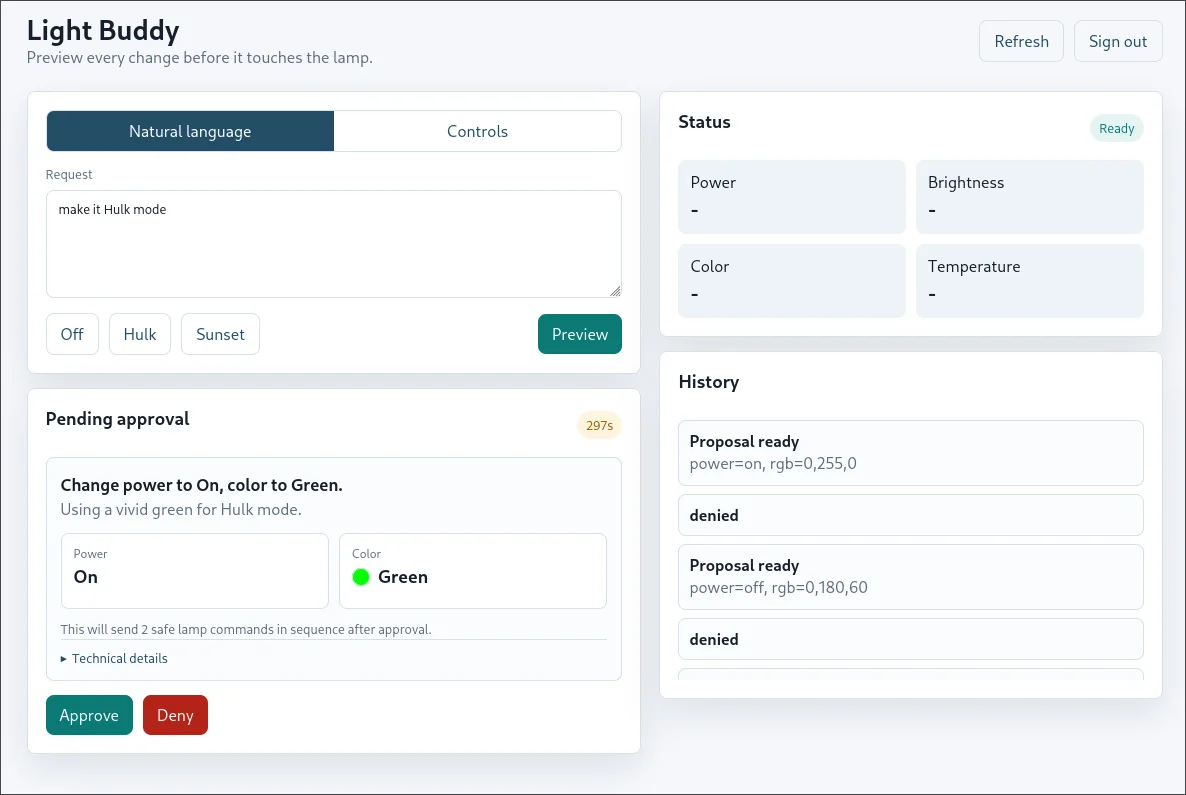
I thought talking to a lamp would be easy.
It's a lamp.
It turns on. It turns off. Sometimes it changes color.
So naturally, I wanted to build a small system where I could send a Telegram message like:
make the room warm and dim
Then a local model would translate that into a safe final lamp state, the bot would ask me to approve it, and only after I pressed Allow would the actual bulb change.
Simple, right?
Here's what I learned from spending way too much time trying to make a Xiaomi / Yeelight bulb listen to me in plain English.
"Make it Hulk mode"
The flow looked like this:
- I send a natural-language request in Telegram.
- LM Studio proposes JSON with fields like
power,brightness,rgb,ct, andtransition_ms. - Python validates the JSON against a small schema.
- The bot shows me the proposed lamp state and the exact commands.
- I approve or deny it.
- Only approved commands go to the lamp.
That last bit is the important bit.
The model does not get to send raw Yeelight methods. It does not get music mode, schedules, alarms, flows, or any other "surely this is fine" dynamic behavior. It gets to suggest a final state. The boring code turns that into known commands like set_power, set_bright, set_rgb, and set_ct_abx.
On paper, the hardware side was already solved. Yeelight LAN control is a real thing. The bulb listens on TCP port 55443, takes JSON, and responds.
For example:
{"id":1,"method":"set_power","params":["on","smooth",500]}
That sounded like exactly what I needed.
It was not the whole story.
"Sunset vibe over two seconds"
I ended up dealing with two different Xiaomi bulbs, because the first one had a stupid surprise waiting at the end.
The first one was a Mi Smart LED Bulb Essential, internally yeelink.light.color5. It used WiFi AP provisioning. I needed to enable LAN mode to be able to control it locally, but there was no such option in the Mi Home app, so I reset it by power-cycling 5 times, connected to its temporary bulb network, pulled the real token with Xiaomi-cloud-tokens-extractor, and enabled LAN mode with python-miio.
That actually worked.
The bulb joined WiFi, got an IP address, and answered the raw miIO hello packet. Then it refused local control anyway, because cloud registration had not completed.
Not "the app was confused."
The firmware itself was basically saying: yes, I am on your WiFi; yes, you have my token; no, you may not control me yet.
That was the first lesson: local protocol does not mean local ownership.
After more fighting with the cloud-lock problem, I eventually got it responding enough to test the actual thing I wanted: colors.
That is when I found out the RGB part of the bulb was broken.
So after dealing with provisioning, tokens, cloud checks, and local-control weirdness, the final blocker was not software at all.
The lamp just could not do the color part.
So I bought a new lamp.
The second bulb was the W4 yeelink.light.colore, and this one did not even use the same setup path. No AP mode. It used BLE provisioning.
It had joined WiFi, but it was still not ready to be controlled.
The problem was that we were in complete internet blackout, so the lamp couldn't reach home and thus wouldn't be set up.
The W4 would advertise over BLE. It would accept WiFi credentials. The Yeelight Android app even reached 100% once.
I tried to man-in-the-middle it by giving it a fake token but that hit a dead end.
So I had to make a new 2.4 GHz SSID that is VPN-routed so that the lamp may connect to it and finally reach Singapore!
One thing led to another and I bricked my TP-Link modem, so I had to buy a MikroTik.
"I'm studying, make it darker"
At this point, the lamp project stopped being about the Telegram bot and became a network investigation.
Because I live in Iran, anything that needs a clean Xiaomi cloud path can turn into a small puzzle. The bulb was on a MikroTik VPN-routed network with proxy routing, Cloudflare DNS, DHCP, and a separate subnet. The phone was on the same network. The bulb was getting a lease. The router could see it.
Still, local control kept failing.
So I checked the usual suspects.
WPA? Probably not. The bulb got DHCP.
Client isolation? The bridge config did not show it.
Firewall? The obvious drops were for traffic to the router, not phone-to-bulb or controller-to-bulb.
Multicast? mDNS was visible, IGMP snooping was off, and unknown multicast flooding was enabled.
Signal? Around -55 dBm, so no.
Then the bulb started doing something even more annoying: it would join WiFi, renew DHCP, stay alive for a few seconds, disconnect, then do it again.
This was the part where I had to keep reminding myself that the end goal was still just changing the color of a room.
Turns out that the lamp checks every few seconds to see if it can reach home, and if it can't, it will disconnect and reconnect to the WiFi.
After making my VPN more stable, the lamp finally could stay connected.
At first the plan was to chat with the lamp in Telegram, but network instability made me realize I have two options: either go crazy trying to work around an unstable network, or make a local web UI. I chose the latter.
I also added miIO and Home Assistant transports, not because I wanted a big abstraction, but because the bulb had already taught me that one control path can disappear for reasons that have nothing to do with your code.
However, I soon learned even in the best of environments the lamp couldn't be trusted, because it simply had an awful quota that would reject connections after a few simple commands.
The final app was not complicated.
Getting the lamp to stay reachable was complicated.
"Just turn off already"
The weird thing is that the LLM part was the calm part.
Tell the model what fields are allowed. Make it return JSON. Validate everything. Clamp unsafe values. Reject extra fields. Preserve current state when the user did not ask to change it. Show the commands before applying them.
That is normal software work.
The hard part was learning what manufacturers mean when they say "LAN control."
In practice, it can mean "local after cloud binding." It can mean "local once the firmware is in the right state." It can also mean "local, unless another integration wedges the control socket."
That is a lot of fine print for a lamp.
Before this, I mostly cared whether a smart-home device had an API. Does Home Assistant support it? Is there a library? Can I send a command?
Now I care about whether it can be boring.
A boring lamp should be able to:
- join WiFi
- keep its IP address
- accept a documented local command
- keep doing those things when the internet is missing
That is not a high bar.
Next time I buy smart-home hardware, I am going to care less about whether the app looks nice and more about boring questions:
- Can it finish setup without a cloud bind?
- Can I control it locally after setup?
- Does the local API still work if the internet disappears?
- Does it behave on plain 2.4 GHz WiFi without special treatment?
Trying to talk to my lamp taught me that the API only matters if you can actually reach it.
Pairing, firmware, WiFi behavior, and cloud checks are part of the product too.
And if a device in my room only behaves when a server somewhere else approves it, then I do not really own a smart lamp.
I own a cloud service that glows.